Customer Management
Keep customer details, conversations, history and next actions together.
Dot Business Systems
Dot. Connecting the dots in your business.
Dot Book replaces scattered spreadsheets, paper notes and WhatsApp chasing with one system for customers, stock, jobs, repairs and takings. It runs on your own device, offline, and it is finished — not a project you wait for.
When the business outgrows its tools
Many owner-run businesses begin with WhatsApp, paper, spreadsheets and memory. These tools may work at first. As customers, jobs, stock and staff increase, the same information becomes harder to find, update and trust.
Before
After
One clear system built around the workflow.
What we build
Keep customer details, conversations, history and next actions together.
See what is waiting, in progress, ready, completed or overdue.
Track what the business owns, where it is and what it has cost.
Keep quotations, approvals, promises and follow-up actions visible.
Give the team a clear next step instead of another message to chase.
Give the owner a useful view of progress, exceptions, costs and history.
All of it is in Dot Book already. Nothing to scope, nothing to build, nothing to wait for.
See Dot BookThe Dot design standard
Every Dot system is engineered to make the next action obvious, keep exceptions visible and preserve proof of what happened. The interface is shaped around the work, not around software jargon.
Dot Book
This is what Dot sells. Dot Book is finished, tested and running in a real shop — it tracks parts out of your stock and into customer jobs, rolls up what each item truly cost you, and shows the profit when it sells. Set up on your tablet, with your stock and customers loaded for you.
R750per month — everything included
Or R7,500 for the year — two months free
Every feature. Your own build, your own link, your own business name, logo and brand colour on it. Send us your stock list and it is loaded before your link goes out. Free updates for as long as you subscribe. No activation fee, no setup fee, and nothing taken off your card turnover — ever.
R4,500once-off, plus the same R750 per month
Gqeberha and Nelson Mandela Bay
Most shops never need this — setting it up over a call takes about an hour and we do it together. If you would rather we came and did it at your counter, loaded your stock beside you and did your first cash-up with you, we will.
Straight about what this costs: R750 a month is the whole price. There is no activation fee, no setup fee, no per-till fee and no percentage of what you sell — which is the part worth reading twice, because the tills advertised as free per month take a cut of every card sale, forever. Ours does not grow when you do. The full price list is here.
First real-world Dot system
A local specialist retail and repair business needed a practical way to bring stock, purchase costs, repairs, parts, customer jobs and profit visibility into one place. Dot built a tablet-first system around the way that business actually works.
The system has been handed over and is operating inside the client’s real business. We name clients only with their written permission, so a fuller case study will follow.
Specialist Dot product
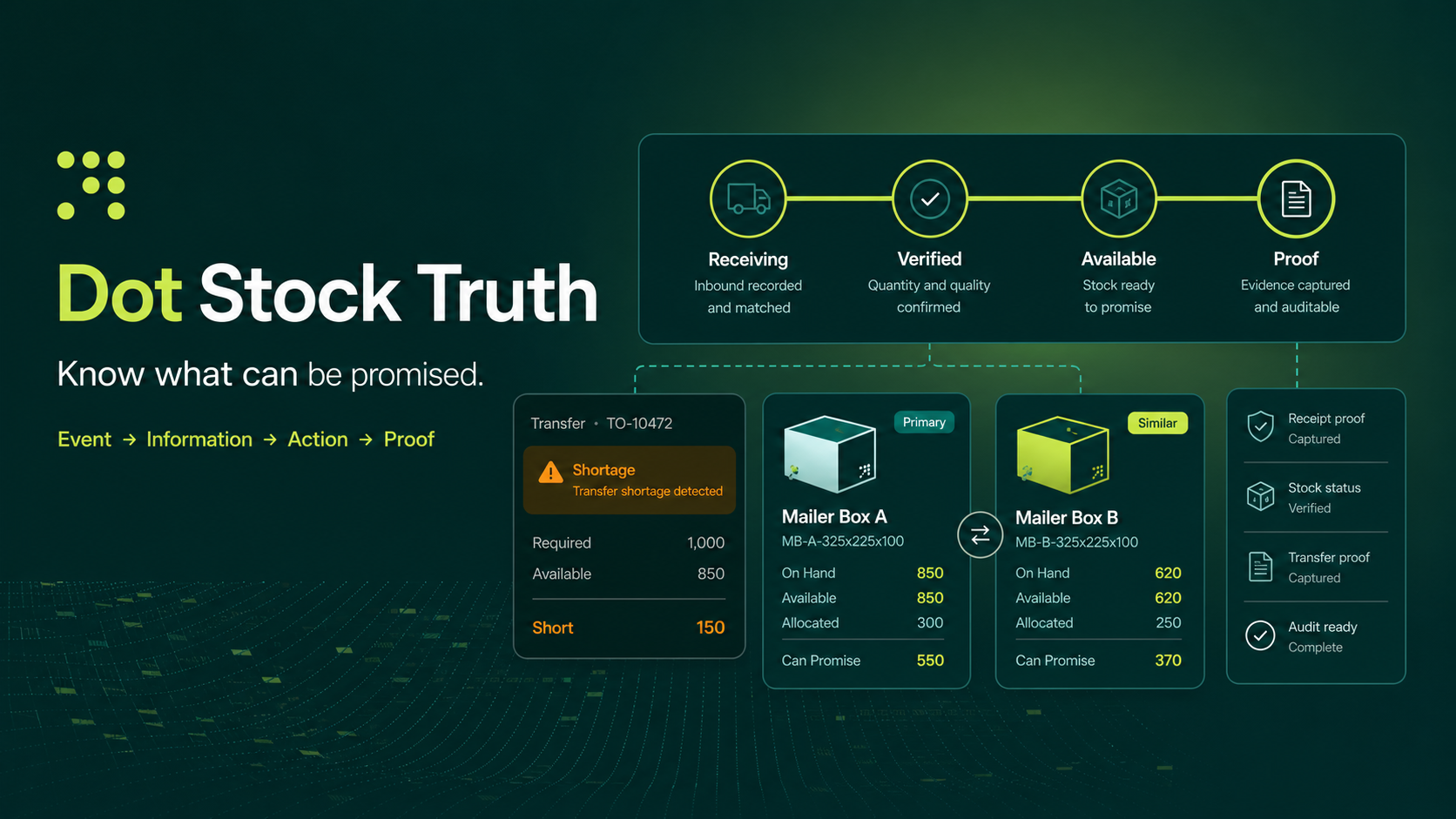
Goods can arrive physically before records, paperwork and the team reflect the same truth. Dot calls this gap Stock Lag.
Event Information Action Proof
A practical process
Map how the business currently handles the work and where information gets lost.
Agree on the first version, important rules, users and required outcomes.
Give the client a working version to test against real business situations.
Deploy the system, guide the users, protect the data and improve it over time.
No vague software project. A defined workflow, a clear first version and a practical handover.
Why Dot?
Dot is founder-led by Darius in Gqeberha and informed by real experience across warehouses, receiving, stock movement, delivery flow, sales and owner-run business pressure.
Dot began with a simple observation: business owners lose enormous amounts of attention when real work happens faster than the information around it.
A delivery arrives. A customer calls. A repair changes stage. A quotation needs follow-up. The event is real, but the useful information, next action and proof are scattered. Dot exists to connect those pieces and give the owner a clearer view of what is happening.
Who it’s for
Dot is best suited to businesses with a real recurring workflow problem and a person who is willing to help shape and test the first version.
Questions & answers
Straight answers, including the ones about what the software does not do. If your question is not here, ask it on WhatsApp and it will be added.
Dot makes one piece of software and sells it to as many businesses as will have it. That is Dot Book, for workshops, retail and second-hand dealers, built in Gqeberha and running in a real shop. It is not built to order — which is exactly why it is R750 a month and improves for everyone at once.
It is not an enterprise rollout. It is one system, doing the parts of your business that are currently scattered across a notebook, a WhatsApp thread and somebody's memory.
It depends where you are, and both routes get you the same software. Anywhere in South Africa, setup is done remotely — you get your own link, we walk through it together, and your stock and customers are loaded for you, so there is no week of typing before it becomes useful.
In Gqeberha and Nelson Mandela Bay we can come to you instead and set it up at your counter. That is a morning. On-site setup is limited to the Bay for now, until there are technicians in other areas.
Either way you get the same software, the same updates and the same price. There is no version of Dot Book that only the bigger customers get.
No, and that is deliberate. Dot is built for the counter, not for an IT department. The rule the whole design follows is that the next step should always be obvious — you should never have to wonder what to press.
Setup is included. Send us your stock list and your customer list in whatever form you have them — a spreadsheet, a photo of a book, an export from your old system — and we load them before your link goes out, so there is no week of typing. Day to day, most people use four or five buttons.
Usually not. Dot runs in a normal web browser on a tablet, a laptop or a desktop, and installs to the home screen like an app — its own icon, its own window, no browser bar. A tablet at the counter is the most common setup.
Name, phone number, email address, and a free-text notes field for anything worth remembering — “only answers after five”, “cash only”, “second time in for this fault”.
A customer needs a name; phone and email are optional.
Jobs also carry the model or serial number of the item, so nobody is hunting for the right part later.
Yes. The trade-specific parts — the stages a job moves through, the stock categories, the wording of the customer message — are configuration, not code. Switching the trade reconfigures the whole system rather than requiring a rebuild. This is why a ready-made install is affordable.
Yes. At the till, every sale is recorded as cash or card, with the items, the time and the person who took it. On a job card, money is two figures: the deposit and what was paid later, against the final charge. The job then shows three numbers that never disagree: invoiced, paid, and still owed.
The Money screen carries a Who still owes you list, largest outstanding first. The owner’s dashboard flags two situations on its own: an item that is ready and not paid for, and an item that has already gone out the door with money still on it. That second one is the one that quietly never gets chased.
They are the normal case, not an exception. Take R500 on booking and the balance on collection, and the job card holds the deposit and the later payment as two separate figures against the final charge. Nothing is a single “paid” tick-box, because a tick-box cannot tell you that half the money is still outside.
It gets corrected, never quietly overwritten. A till sale already recorded cannot be edited — a mistake is fixed by recording a refund, which is its own line with its own reason, and the original entry stays where it is. On a job card the amount can be changed, but only with a reason, and that reason is kept with the job.
That is deliberate. A money trail you can silently rewrite is not a money trail. This way, what you see on a job at the end of the month is what actually happened, in order, with a name against each line.
That is exactly what the takings screen is for. It shows the day’s money split by method — cash separately from card — because cash gets counted and card gets checked against a statement. Underneath is every individual receipt with the time and the person who took it.
Yes, and it stays switched off until you turn it on. Charging VAT without being registered is an offence, so it is not something a system should default to or a staff member should be able to knock on by accident.
Once you enter your VAT number, Dot splits every amount into the excluding-VAT figure and the VAT portion, on the job and on the day’s takings, and carries your VAT number through. It handles prices captured VAT-inclusive (the usual way a counter works) or VAT-exclusive, at whatever rate SARS is charging.
No, and it does not pretend to. Your card machine is still your card machine and the bank is still the bank. Dot records what was taken and how, so your jobs, your debtors and your day’s takings are right — it does not process the card itself and it never touches card numbers.
The same goes for amounts. Type “1 200,50” the way it is printed on a South African invoice and Dot shows you what it read — R1 200,50 — before you commit to it. It will not silently turn a comma into a hundred-times mistake.
Yes, and this is the part most owners care about most. Every person gets their own login with their own passcode. As the owner you hold all rights, and you decide — person by person — exactly what each one can see and do.
There are eleven separate rights, including seeing money and margins, booking and updating jobs, adjusting stock, changing prices, messaging customers, exporting data, changing settings, and adding people. Start someone on a role such as Manager, Front desk or Technician, then fine-tune any individual right for that person.
In practice: your technician signs in and the Money tab, the owner’s dashboard, Export and Settings are simply not there.
A passcode is never stored as readable text. Each one is scrambled using PBKDF2-SHA256 at 310,000 iterations with a unique salt per person — the current OWASP standard. Even holding the raw stored data, nobody can read anyone’s passcode.
The system locks itself after twelve minutes of inactivity, and every meaningful action — who signed in, who changed a job stage, who exported data, who messaged a customer — is written to an audit record.
Here is the straight answer, because it matters more than a reassuring one.
On a local install, this is genuine day-to-day access control. It stops a staff member casually seeing your margins, changing your settings or exporting your customer list, and it records who did what. That is real and it is what most owners are actually worried about.
What it is not, on its own, is protection against a technically skilled person with physical possession of the device. The data lives on that device, so someone determined and capable could read it directly.
On a local install the data lives on your device, not on somebody else’s server. That is a deliberate privacy decision — and it is also the limitation, so it comes with a routine rather than a promise.
There is a backup button you press at the end of the day. It shares a backup file from the device to your own WhatsApp, email or folder; we never hold a copy. Restoring a backup puts everything back — records and photographs.
Your information also exports to a spreadsheet whenever you want. It is your data, not ours.
Yes. A local install runs offline at the counter by design. Load-shedding and a dead line stop the internet; they do not stop you booking in a job or ringing up a sale.
POPIA is treated as a design constraint, not a disclaimer at the bottom of a page.
Customer messages are drafted by the system and sent by a human — nothing is ever sent automatically on your behalf. Where Dot handles outreach to businesses that are not yet customers, it enforces the single-approach rule, requires an opt-out sentence in the first message, and keeps the record of who asked not to be contacted again, because under POPIA the burden of proof sits with you.
Dot is a software supplier, not a law firm, and this is not legal advice. But the system is built so that doing the right thing is the default rather than something you have to remember.
R750 a month, or R7,500 for the year with two months free. That is the whole price — every feature, your own build and branding, your stock and customers loaded for you, free updates, and support. There is no activation fee, no setup fee, and we take nothing off your card turnover.
If you would rather we came and set it up at your counter, that is R4,500 once-off in Gqeberha and Nelson Mandela Bay — but most shops never need it, because setting it up over a call takes about an hour and we do it together. That is the whole price list; there is nothing else to buy.
No. Your information exports to a spreadsheet whenever you want, and the data is yours. Owners fear dependency more than they fear cost, and that is a fair instinct — the export button exists because of it.
Not for one business on its own, and that is deliberate. Keeping Dot Book the same for everybody is what keeps it at R750 a month, and what lets one fix reach every client at once instead of one.
What we build instead are editions — workshop and second-hand dealer — so a whole trade gets what it needs. If you tell us something is missing and other shops in your trade would use it too, that is exactly how it gets built.
One business here in Gqeberha, running live — specialist retail and repair. We will not name a client without their written permission, which is the same courtesy you would be given.
Still unsure? Ask the awkward question directly. A clear no is more useful to you than a vague yes.
Contact
Send Dot a short WhatsApp message about the information, jobs, stock or follow-ups your business keeps chasing. We will tell you honestly whether Dot Book covers it — and if it does not, we will say so rather than sell you it.
“Hi Dot, I would like to discuss a practical system for my business. My business name is [business name], and the thing taking most of our time is [workflow].”
Prefer email? info@dotreceive.co.za — it comes straight to Darius.
Currently focused on Gqeberha / Port Elizabeth and nearby areas, with remote discussions available where practical.
Your details are only used to respond to your enquiry. No spam. No mailing list.